
Multi-account IPAM: replacing the spreadsheet with a pool hierarchy
A CIDR spreadsheet doesn't stop two VPCs from taking the same block. Organize addressing into root, Region, and environment in Amazon VPC IPAM, with netmask limits declared in Terraform.
One team opens the addressing spreadsheet, finds a free row, and creates the payments VPC with 10.20.0.0/16. The same week, another team, in another account, does the same with an outdated copy of the spreadsheet. Both VPCs work on their own. The problem only shows up when someone tries to attach them to the Transit Gateway: two routes to the same destination, and one of the networks has to be renumbered.
In the previous post in this series, hub-and-spoke routing depended on each VPC having a unique CIDR. This post covers the step before that: how to hand out those CIDRs across accounts and Regions without relying on someone checking the right version of the spreadsheet.
The tool is Amazon VPC IP Address Manager (IPAM). The example is synthetic: the company, the accounts, and the addresses are fictitious. The structure reproduces decisions I saw in projects I followed, rebuilt for this article.
What the spreadsheet doesn't guarantee
The spreadsheet records an intention, but it takes no part in creating the VPC. Anyone with ec2:CreateVpc permission can type a CIDR that never went through it. To replace it, the solution needs to meet four requirements:
- Atomic reservation. Choosing the block and creating the VPC must happen in the same operation, with no manual step in between.
- Limits per context. Production in
sa-east-1must not consume space reserved for development inus-east-1. - Controlled size. Nobody should request a
/12for a test VPC. - Visibility. It must be possible to know how much space is left before it runs out.
The example's constraints are common in multi-account environments:
| Account | Fictitious ID | Role |
|---|---|---|
| Network | 111111111111 | IPAM delegated administrator, owns the pools |
| Production | 222222222222 | Creates production VPCs |
| Non-production | 333333333333 | Creates development and staging VPCs |
The available private space is 10.0.0.0/8. Two Regions are in use, sa-east-1 and us-east-1, and there are three environments: prod, nonprod, and shared, the last one for common services, such as the egress VPC from the previous post.
Three ways to organize it
Keep the spreadsheet and review pull requests. It's cheap and doesn't require a new service. Review, however, only reaches what goes through the repository. A CIDR created from the console or by another pipeline remains invisible.
One pool per account or per environment, with no hierarchy. IPAM starts allocating the blocks, but each pool gets a standalone CIDR. If a new Region comes along, there won't be a contiguous block for it, and routes between Regions can no longer be summarized.
A tree of pools: root, Region, environment. Each level gets a slice of the level above. The root defines the total space, the Region pins where the pool can be used, and the environment defines the netmask rules. VPCs allocate only from the leaves.
The order between Region and environment is a choice, not an AWS requirement. Putting the Region above the environment makes each Region occupy a contiguous block, such as 10.0.0.0/12, which can be advertised as a single route to another Region. The reverse order favors per-environment firewall rules that apply in every Region. I chose Region first for route summarization, which ties in with the routing in the previous post. In either order, remember that the locale, the property that binds a pool to a Region, can only be set at creation: after that, it can't be changed.
The example's pool tree
The 10.0.0.0/8 root holds sixteen /12 blocks. Each Region gets one. Within each Region, each environment gets a /14, and the fourth /14 is left free as a reserve:
Default private scope
└── root 10.0.0.0/8                     (no locale)
    ├── sa-east-1 10.0.0.0/12           (locale sa-east-1)
    │   ├── prod     10.0.0.0/14
    │   ├── nonprod  10.4.0.0/14
    │   ├── shared   10.8.0.0/14
    │   └── (reserve 10.12.0.0/14, not provisioned)
    └── us-east-1 10.16.0.0/12          (locale us-east-1)
        ├── prod     10.16.0.0/14
        ├── nonprod  10.20.0.0/14
        ├── shared   10.24.0.0/14
        └── (reserve 10.28.0.0/14, not provisioned)
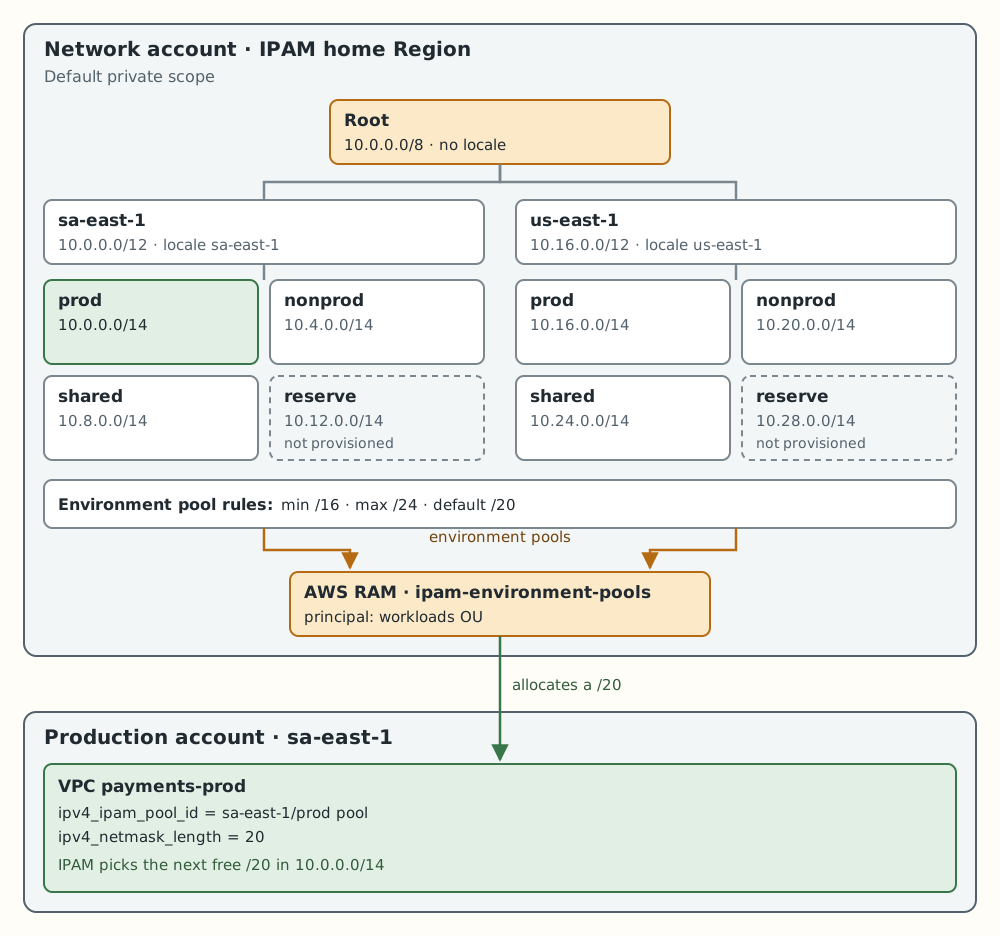
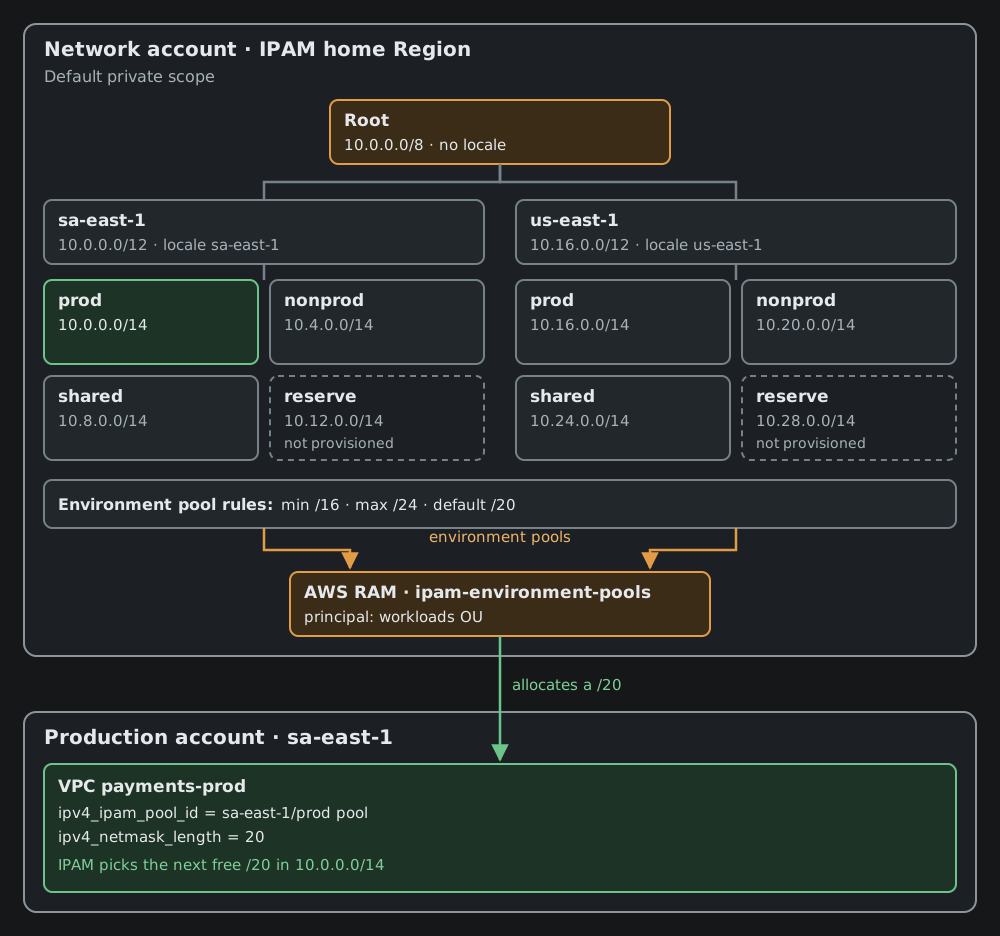
Teaching example; the blocks don't represent a real environment.
Three rules from the documentation explain this shape:
- The root has no locale. The guide to creating the top-level pool says to choose None on the root and set the locale on the Regional pool.
- A VPC only allocates from a pool with the same locale as its Region. That's why the leaves need to carry the Region. In the example, I also declare the Regional pool's locale on the environment pools.
- The default depth is up to 10 levels. The depth quota is adjustable. Three levels are enough here; limiting the tree to two or three levels in an internal module is a choice for simplicity, not a service limit.
Netmask rules: the limits that stay declared
Allocation rules turn the spreadsheet's policy into pool attributes. In the example's environment pools:
| Rule | Value | Effect |
|---|---|---|
| Minimum netmask | /16 | Largest block a VPC can receive |
| Maximum netmask | /24 | Smallest block a VPC can receive |
| Default netmask | /20 | Size used when the allocation doesn't specify one |
The names are confusing: the minimum netmask defines the largest block, because fewer bits mean more addresses. A VPC that requests a /25 from this pool violates the maximum netmask, and the documentation states that creation fails. Since an IPv4 VPC only accepts blocks from /16 to /28, the /16 minimum netmask matches the VPC's own limit; in this example, the rule that actually restricts is the maximum. Existing resources outside the rule are flagged as noncompliant.
Two details prevent surprises:
- Rules are not inherited. The Regional pool guide says that if no rule is applied, the pool has no rules. Each level needs to declare its own.
- Rules apply only to the pool's own resources. They don't apply to child pools.
The default size is also a capacity decision. A /14 holds four /16 VPCs, 64 /20 VPCs, or 1,024 /24 VPCs. With a /16 default, the fifth production VPC in a Region would no longer have room. I chose /20 as the default and kept /16 as a possible exception.
There's also the option to require tags on resources that allocate from the pool. It isn't part of the minimal example, but it's useful to keep a VPC without the production tag from consuming the production pool.
Minimal Terraform implementation
The code below runs in the network account, in the IPAM home Region. The us-east-1 pools are created from there too: the locale indicates where the pool can be used, not where the API is called.
terraform {
  required_version = ">= 1.6"
  required_providers {
    aws = {
      source  = "hashicorp/aws"
      version = "~> 6.0"
    }
  }
}

provider "aws" {
  region = "sa-east-1" # IPAM home Region
}

locals {
  root = "10.0.0.0/8"

  regions = {
    "sa-east-1" = "10.0.0.0/12"
    "us-east-1" = "10.16.0.0/12"
  }

  # Position of the /14 inside each Region's /12. Index 3 is left free.
  environments = {
    prod    = 0
    nonprod = 1
    shared  = 2
  }

  environment_pools = merge([
    for region, cidr in local.regions : {
      for env, i in local.environments : "${region}/${env}" => {
        region      = region
        environment = env
        cidr        = cidrsubnet(cidr, 2, i)
      }
    }
  ]...)
}

resource "aws_vpc_ipam" "main" {
  description = "Organization IPAM (example)"
  tier        = "advanced"

  dynamic "operating_regions" {
    for_each = keys(local.regions)
    content {
      region_name = operating_regions.value
    }
  }
}

# Level 1: root, no locale.
resource "aws_vpc_ipam_pool" "root" {
  address_family = "ipv4"
  ipam_scope_id  = aws_vpc_ipam.main.private_default_scope_id
  description    = "root"
}

resource "aws_vpc_ipam_pool_cidr" "root" {
  ipam_pool_id = aws_vpc_ipam_pool.root.id
  cidr         = local.root
}

# Level 2: one pool per Region.
resource "aws_vpc_ipam_pool" "region" {
  for_each = local.regions

  address_family      = "ipv4"
  ipam_scope_id       = aws_vpc_ipam.main.private_default_scope_id
  source_ipam_pool_id = aws_vpc_ipam_pool.root.id
  locale              = each.key
  description         = "region ${each.key}"
}

resource "aws_vpc_ipam_pool_cidr" "region" {
  for_each = local.regions

  ipam_pool_id = aws_vpc_ipam_pool.region[each.key].id
  cidr         = each.value

  depends_on = [aws_vpc_ipam_pool_cidr.root]
}

# Level 3: environment inside the Region. VPCs allocate from here.
resource "aws_vpc_ipam_pool" "environment" {
  for_each = local.environment_pools

  address_family      = "ipv4"
  ipam_scope_id       = aws_vpc_ipam.main.private_default_scope_id
  source_ipam_pool_id = aws_vpc_ipam_pool.region[each.value.region].id
  locale              = each.value.region
  description         = "${each.value.environment} in ${each.value.region}"

  allocation_min_netmask_length     = 16
  allocation_max_netmask_length     = 24
  allocation_default_netmask_length = 20

  tags = {
    environment = each.value.environment
  }
}

resource "aws_vpc_ipam_pool_cidr" "environment" {
  for_each = local.environment_pools

  ipam_pool_id = aws_vpc_ipam_pool.environment[each.key].id
  cidr         = each.value.cidr

  depends_on = [aws_vpc_ipam_pool_cidr.region]
}
The depends_on on each aws_vpc_ipam_pool_cidr isn't decorative. The child pool references the parent pool, but not the parent's CIDR. Without the explicit dependency, Terraform may try to provision 10.0.0.0/14 before 10.0.0.0/12 exists in the Regional pool, and the API requires the child's CIDR to be available within the parent's range.
tier = "advanced" is explicit, even though it's the provider default. I prefer to keep visible a choice that affects the bill, as I discuss below.
Sharing with the workload accounts
The VPCs live in other accounts, so the environment pools need to be shared through AWS RAM. Sharing is only possible with IPAM integrated with AWS Organizations, and it must be created in the IPAM home Region. The IPAM integration doesn't replace another prerequisite: RAM sharing with AWS Organizations must be enabled first, and that's done from the organization's management account. The code below doesn't cover that step. The minimum, still in the network account:
variable "workloads_ou_arn" {
  type        = string
  description = "ARN of the OU allowed to allocate from the environment pools"

  validation {
    condition     = length(var.workloads_ou_arn) > 0
    error_message = "Without a principal, the share exists, but nobody can use the pool."
  }
}

resource "aws_ram_resource_share" "pools" {
  name                      = "ipam-environment-pools"
  allow_external_principals = false
}

resource "aws_ram_resource_association" "pools" {
  for_each = aws_vpc_ipam_pool.environment

  resource_share_arn = aws_ram_resource_share.pools.arn
  resource_arn       = each.value.arn
}

resource "aws_ram_principal_association" "workloads" {
  resource_share_arn = aws_ram_resource_share.pools.arn
  principal          = var.workloads_ou_arn
}
The validation exists for a practical reason. In one project I followed, the share and the resource associations were in the code, but the association with the organization was commented out and the principal came from a variable that was empty by default. I didn't check whether the value was supplied somewhere else; the point is that the code, on its own, didn't guarantee the share. Without a principal, RAM accepts the resource and apply finishes without errors, but no account gets access to the pool. Sharing every environment with a single OU is also a simplification: in practice, production and non-production usually go to different OUs.
How the other account finds the shared pool is the subject of the next post. Here, the ID arrives through a variable.
The consuming VPC
In the production account, with the provider in the same Region as the pool:
variable "ipam_pool_id" {
  type        = string
  description = "ID of the sa-east-1/prod pool, published by the network account"
}

resource "aws_vpc" "payments" {
  ipv4_ipam_pool_id   = var.ipam_pool_id
  ipv4_netmask_length = 20

  tags = {
    Name        = "payments-prod"
    environment = "prod"
  }
}

output "allocated_cidr" {
  value = aws_vpc.payments.cidr_block
}
The VPC doesn't declare cidr_block. It asks the pool for a /20, and IPAM picks the next free block inside 10.0.0.0/14. I declare the netmask even though the pool has a default, so the size shows up when the consuming account's code is reviewed.
Both modules went through terraform fmt and terraform validate with AWS provider 6.72.0. The example wasn't applied to a real account for this article.
Where IPAM doesn't protect you
VPCs created with a manual CIDR. IPAM prevents overlap among the allocations it makes itself. A VPC created with a typed cidr_block doesn't go through the pool. The documentation is explicit: if the VPC doesn't use the IPAM-allocated CIDR option, the chosen block may overlap an allocation. I saw code with the comment "ensures there is no overlap" above the pool hierarchy; the guarantee only holds for whoever allocates from the pools.
IPAM monitors overlap on unmanaged resources too and flags overlapping CIDRs in the same scope. That's detection, after the fact. To prevent creation, AWS documents an SCP that denies ec2:CreateVpc and ec2:AssociateVpcCidrBlock when the ec2:Ipv4IpamPoolId key is absent. Before applying it, map who still creates VPCs with a manual CIDR: the SCP blocks those people and pipelines too.
Networks that already exist. auto_import brings into the pool the CIDRs found in its range, but with its own rules: it imports even if the resource violates the rules, picks the largest block when there's overlap, and requires a locale on the pool. Bringing in legacy networks deserves its own post, the next one in the series.
Exhausted pool. When the pool has no free block of the requested size, there's nothing to allocate, and VPC creation fails in the consuming account, in the middle of apply. I didn't reproduce the error for this article, so I don't quote the message; what matters is that the problem shows up for whoever creates the VPC, not for whoever manages the pool. The environment pool can receive another CIDR from the parent, such as the reserved /14, but that block won't be contiguous with the first one. The space doesn't come back right away either: according to the provider documentation, allocations created by a VPC can take up to 30 minutes to be released.
Wrong Region. A VPC in us-east-1 doesn't allocate from a pool with locale sa-east-1. That protects the separation, but turns a swapped pool ID into a creation error.
Tier and cost. In the IPAM features table, the Free Tier covers a single Region and account and doesn't include private IPv4 management or pool sharing. Even with a single Region, the design in this post requires the Advanced Tier. It's billed per active IP address per hour, and, with IPAM integrated with Organizations, the count includes IPs monitored in member accounts. The cost therefore depends on the number of active IPs in the organization, not on the number of pools. Estimate it with the pricing page before enabling it.
Administration. The Organizations integration requires the IPAM administrator account to be a member account: the management account can't fill that role.
How to check the tree without creating anything
The commands below only read state. The IDs are fictitious; replace them with your account's and use a profile with read permission.
# Network account, home Region: pools, depth, and rules
aws ec2 describe-ipam-pools --profile network-readonly --region sa-east-1 \
  --query 'IpamPools[].{id:IpamPoolId,desc:Description,locale:Locale,depth:PoolDepth,min:AllocationMinNetmaskLength,max:AllocationMaxNetmaskLength,def:AllocationDefaultNetmaskLength}' \
  --output table

# CIDRs provisioned in a pool and the state of each one
aws ec2 get-ipam-pool-cidrs --profile network-readonly --region sa-east-1 \
  --ipam-pool-id ipam-pool-0aaaabbbbccccdddd

# What has already been allocated from the sa-east-1/prod pool (use the locale's Region)
aws ec2 get-ipam-pool-allocations --profile network-readonly --region sa-east-1 \
  --ipam-pool-id ipam-pool-0aaaabbbbccccdddd \
  --query 'IpamPoolAllocations[].{cidr:Cidr,type:ResourceType,resource:ResourceId,account:ResourceOwner}'

# Overlapping CIDRs in the private scope, managed or not
aws ec2 get-ipam-resource-cidrs --profile network-readonly --region sa-east-1 \
  --ipam-scope-id ipam-scope-0eeeeffff00001111 \
  --query "IpamResourceCidrs[?OverlapStatus=='overlapping'].{cidr:ResourceCidr,resource:ResourceId,account:ResourceOwnerId}"
get-ipam-pool-allocations must be called in the Region of the pool's locale. For the us-east-1/prod pool, change the Region.
Comparing the provisioned CIDRs with the allocations shows the remaining space, but only at the moment of the query. To track it over time, IPAM publishes metrics in the AWS/IPAM namespace, in the home Region: PercentAvailable and PercentAssigned per pool, and OverlappingResourceCidrs and UnmanagedResourceCidrs per scope. An alarm on PercentAvailable for the environment pools warns you before the next VPC fails. The threshold depends on how often the team creates VPCs.
After the first real apply, a negative test is worth it, in the same spirit as the previous post. In a non-production account, try to create a /25 VPC from the nonprod pool. Creation should fail because of the maximum netmask rule. Don't test with a block larger than /16: the VPC would reject the request even without a rule on the pool, and the test wouldn't prove anything. If it succeeds, the rule isn't where you think it is: delete the VPC and review the pool. This is the only step in this section that tries to create a resource.
What I'd take to the next project
- Design the addressing plan before the code. IPAM enforces the plan; it doesn't decide how many Regions and environments you'll have. Leave reserved blocks at each level.
- Declare the rules on every pool that allocates to resources. No rule is inherited.
- Treat the "there's no overlap" comment as a hypothesis. Without the SCP, the guarantee only covers whoever allocates from the pools.
- Validate the share's principal. A RAM share with no principal doesn't raise an error on
apply. - Monitor free space. An exhausted pool only shows up when someone tries to create the next VPC.
- Choose the tier knowing what it covers. The bill doesn't depend on the number of pools.
The spreadsheet doesn't have to disappear: it can stay as a planning document. The difference is that reserving the block now happens in the same call that creates the VPC.
The next posts in the series pick up from here: how to bring existing networks into IPAM, and how a workload account finds a pool it received through RAM without relying on a hand-copied ID.